Publishing a website answers one question: how do we get it online? It leaves another: who takes care of it as the business changes?
A page may start with an AI builder, a CMS template or custom code. Once it represents a business, the everyday questions are similar. Can customers enquire? Is the information current? Who makes the next change, checks the result and helps if something breaks?
Start with the setup you actually have.
“Built with AI” describes part of the creation process. It does not tell you everything about the finished website. Your site might live inside a hosted platform or depend on a code repository, a deployment service and a separate database.
Write down the platform, hosting, domain provider and services connected to the site. If you cannot identify these, ask the person who built it for a short handover. This is the starting point for deciding what maintenance is needed and who can perform it.
Three common setups behind an AI-built website.
AI tools produce websites in quite different ways, and each one changes what maintenance involves:
- A site inside a hosted builder. The AI helps create pages in a platform that also hosts them. The vendor runs the servers and updates the platform; you look after content, settings, integrations and the account itself.
- Generated code deployed to a hosting platform. The AI writes code — often a modern JavaScript framework — that is stored in a repository and published through a deployment service. Everything the code depends on, from packages to build settings, needs looking after.
- A CMS with AI features. A traditional content management system where AI helped with layouts or text. Maintenance looks much like any other site on that CMS.
If you are not sure which one you have, the account you log in to when you want to change something is usually the best clue.
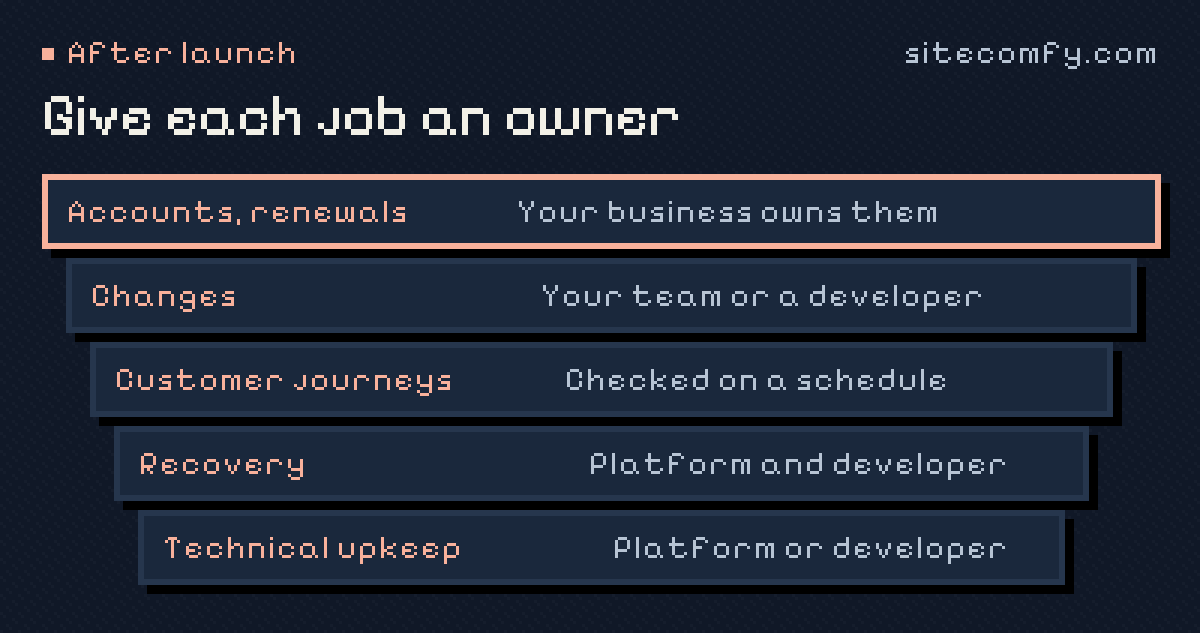
Give each responsibility an owner.
A hosting provider, platform vendor and developer may each handle different parts of the system. Agree who is responsible for the tasks below instead of assuming they belong to the same subscription.
- Accounts and renewals: domain, hosting, platform subscriptions and any paid integrations.
- Changes: updating content, adding pages and adjusting features.
- Customer journeys: checking that an enquiry or booking reaches the intended destination.
- Recovery: knowing how to reverse a change or restore the parts of the site you control.
- Technical upkeep: maintaining relevant dependencies and configuration where the platform does not handle them.
Check a real business journey.
Choose one important action on the website. For a service business, that might be requesting a quote. Follow the form from the visitor’s view, then confirm where the enquiry arrives and who receives it.
Agree how any repeated tests should work. Test data should be recognisable and should not trigger unwanted customer messages, paid actions or live orders. A page loading successfully and a complete business journey working are different checks.
Make future changes easier to manage.
Before editing, understand how the change will be reviewed and how the previous version can be recovered. Depending on the platform, that may mean a staging environment, a preview deployment or a version history with a verified restore route.
Keep a simple record of what changed and why. The next developer should be able to understand the important decisions without reconstructing the whole project from prompts or chat history.
Questions to ask the person who built it.
If a freelancer, an agency or a colleague created the site with AI tools, a short conversation before they move on saves a lot of guesswork:
- Which platform, repository and hosting does the site use, and under whose account?
- How is a change made and published today?
- Which services does the site connect to, and where are their logins kept?
- Where do form submissions go, and who receives them?
- Is there a backup or export, and has anyone restored it?
- What is known not to work, or was left unfinished?
Written answers to these six questions make a better handover than a long call nobody remembers.
Signs the website needs attention.
- Nobody is sure who can log in to the platform or the domain account.
- Small text changes wait for weeks because nobody feels able to make them.
- Enquiries have gone quiet and nobody has checked the form.
- Browser warnings, broken links or outdated information appear on the site.
- A renewal or billing email from a provider nobody recognises arrives.
None of these is dramatic on its own. Together, they usually mean the website has no owner — which is the problem ongoing care solves.
You may be able to keep what you have.
An AI-assisted origin is not, by itself, a reason to rebuild a website. A useful review asks whether the current implementation can be accessed, maintained and extended for the business’s needs.
If the setup has limitations, document them. Some can be worked around, some need a defined repair project, and some may justify replacing part of the site. That decision should follow the review.
A short handover checklist.
- A list of accounts, their owners and renewal responsibilities.
- Appropriate access to the platform or source code.
- A record of forms, integrations and their destinations.
- The process for testing and publishing changes.
- A practical way to reverse a change or recover important data.
- Known issues and the next business priorities.
- A named person to contact and agreed support expectations.
You do not need to become the developer to ask for these things. You need enough visibility to know who is looking after the website and what happens when it needs work.
Make room for what comes after launch.
AI can be part of how your website is built and improved. Ongoing care gives that work continuity: a person who understands the setup, checks changes and helps decide what to do next.
Tell SiteComfy about your website to discuss whether we can take on its maintenance and development. Already using WordPress? Explore WPComfy for our specialist care offer.
Frequently asked questions.
Can a developer maintain a website that was built with AI?
Usually, yes, once they can access the platform or the code. What matters is the underlying setup — the platform, hosting, integrations and how changes are published — rather than the tool that produced the first version.
Do AI-built websites need less maintenance?
Not necessarily. A hosted builder removes some technical upkeep, but content, integrations, forms, accounts and renewals still need an owner. Generated code on your own hosting can need as much care as any custom site.
Should I rebuild my AI-built website on a different platform?
Only if a review shows a real reason: you cannot access or change it safely, it cannot do what the business needs next, or it cannot be kept current. Many AI-built sites can simply be taken over and improved.
What should I have before handing my website to someone new?
Access to the platform or code, a list of accounts and their owners, where forms and integrations send data, how changes are published and how to recover the site, plus known issues and next priorities.