Most small businesses don’t need a complicated maintenance process. They need a short list of checks, done regularly, by someone who knows what to do when a check fails.
The list below is a starting point. Which items apply depends on how your website is built, so each section notes where a hosted platform and a custom setup differ.
Before you start: a one-page site map.
A checklist is much easier to follow when you know what you are checking. Put these on a single page and keep it where the team can find it:
- The platform and where the site is hosted.
- The domain registrar and who has access.
- The three to five pages that matter most, and the forms or bookings that bring in business.
- Connected services: email, CRM, booking, payments, analytics.
- Who to contact when something goes wrong.
Every month.
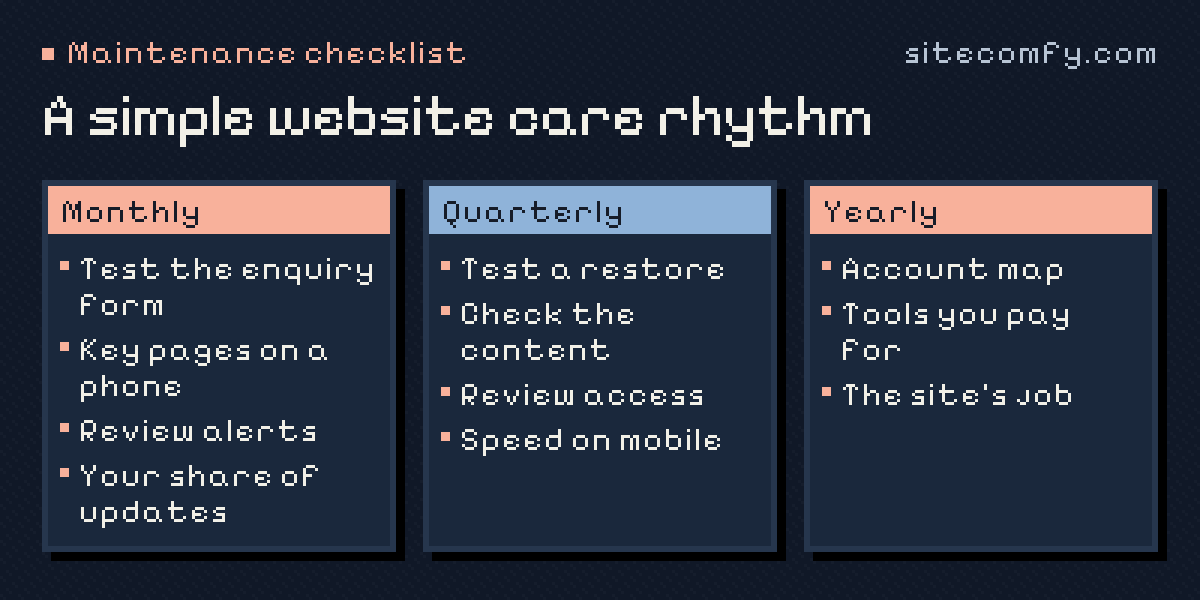
- Test your main enquiry route. Send a recognisable test message through the contact or booking form and confirm it arrives where it should.
- Look at the key pages on a phone. Homepage, services, contact. Anything broken, outdated or hard to tap?
- Review alerts. Uptime or certificate warnings, failed payments for connected services, messages from your platform.
- Apply updates that are your responsibility. On a hosted builder, the vendor handles most of the platform; apps or integrations you added may still need attention. On your own hosting or custom code, this can include the CMS, extensions, dependencies and the server environment.
- Confirm a recent recovery point exists. A backup, export or version you could return to.
Every quarter.
- Test a restore. A backup you have never restored is a hope, not a plan. Restore to a test copy where possible.
- Check content accuracy. Prices, opening hours, team members, service descriptions, legal pages.
- Review who has access. Remove accounts for people and suppliers who no longer need them.
- Look at speed on a slow connection. A page that feels fine in the office may crawl on mobile data.
- Scan for broken links and missing images.
Every year.
- Walk through the account map. Domain, DNS, hosting or platform, code and connected services: who owns each, and when does it renew?
- Review the tools you pay for. Cancel what you no longer use; check that what remains is still supported.
- Revisit the website’s job. Does it still describe the business you are today? What should it do better next year?
Who does what.
Not every item has to fall on one person. A practical split for a small team:
- Someone in the team owns content accuracy, the monthly form test and the yearly review of what the website should do.
- The platform or host handles the infrastructure it controls — on a hosted builder, that is most of the technical layer.
- A developer or care provider takes the updates, recovery tests, access reviews and anything that needs technical judgement.
Write the split down. Checklists fail most often when everyone assumes an item belongs to someone else.
Hosted builder or own hosting: what changes.
On a hosted builder, the monthly updates item mostly shrinks to the apps and integrations you added, and recovery depends on what the platform offers — check it before you need it. On your own hosting or custom code, the list grows: the CMS and its extensions, dependencies, the server environment, certificates and backups you control. Our note on hosted builders versus your own code goes into the differences.
When a check fails.
The checklist is only half the work. The other half is knowing who fixes what: the platform vendor, your hosting provider, a developer or someone on your team. Agree that in advance, so a failed form test on a Friday afternoon has a clear next step.
It also helps to separate problems caused by routine updates from older faults and new requests. The first should be handled as part of maintenance. The others usually need an estimate and a decision.
On WordPress?
WordPress sites add plugins, themes and PHP versions to the list. Our sister service WPComfy has a detailed WordPress maintenance checklist with weekly, monthly and quarterly tasks.
Rather hand it over?
If the list is useful but nobody has time to own it, that is what ongoing website care is for. Tell us about your website, and we’ll suggest which checks matter for your setup.
Frequently asked questions.
How often should a small business website be checked?
A short check every month covers most risks: the enquiry form, key pages on a phone and any alerts. Restore tests, content reviews and access reviews fit a quarterly rhythm.
Can I do website maintenance myself?
Many checks, such as testing forms and reviewing content, need no technical skills. Updates, recovery tests and fixing problems are where a developer or care provider usually saves time and risk.
What is the most important item on the checklist?
Knowing that enquiries reach the right person, and having a tested way to recover the site. Most other problems are inconvenient; these two cost business.
Does a website on a hosted builder need maintenance?
Yes, but less of it. Content, forms, integrations, accounts and renewals still need an owner, even when the platform looks after the servers.